
Getting Started with Caring from the Heart: Connecting Through Emotion-Based Dementia Care
Thank you for your interest in the Caring from the Heart: Connecting Through Emotion-Based Dementia Care eLearning developed by the Ontario CLRI at Baycrest.
Follow the instructions below based on how you access Baycrest eLearning.
1 GET STARTED
Go to the Login Page
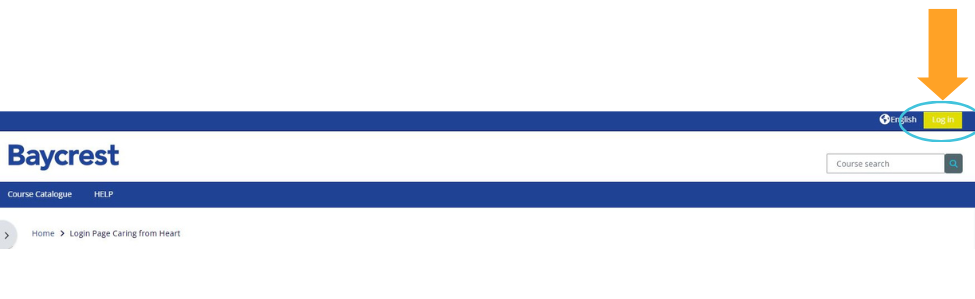
Select the LOGIN button located at the top right of the page.
2 CHOOSE YOUR ACCESS PATH
How do you access Baycrest eLearning?
Choose the option that applies to you, then follow the instructions in that section.
Existing Baycrest, Rotman, CABHI Staff & Volunteers
If you already have a Baycrest eLearning account, follow these steps to self-enrol in Caring from the Heart.
1. Log in to Baycrest eLearning
Enter your existing Baycrest eLearning username and password under:
“Baycrest, Rotman, CABHI staff, volunteers, and existing users log in here.”
2. Open the Course Catalogue
Once you are logged in, navigate to the Course Catalogue.
3. Find Caring from the Heart
Search for or locate Caring from the Heart: Connecting Through Emotion-Based Dementia Care in the Course Catalogue and open the course.
4. Self-enrol in the course
Follow the on-screen instructions to self-enrol.
Once enrolled, you can begin the Caring from the Heart: Connecting Through Emotion-Based Dementia Care modules.
Non-Baycrest Users
If you do not already have a Baycrest eLearning account, create one using the steps below.
1. Create a new account
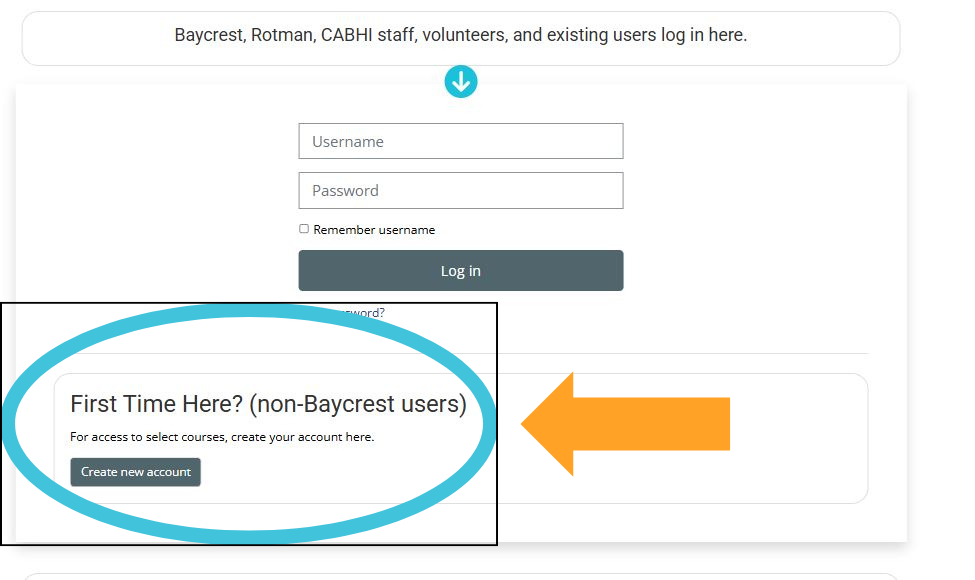
Under “First Time Here? (non-Baycrest users)”, select “Create new account.”
2. Select Caring from the Heart as your Role
Complete all required fields in the registration form.
Important
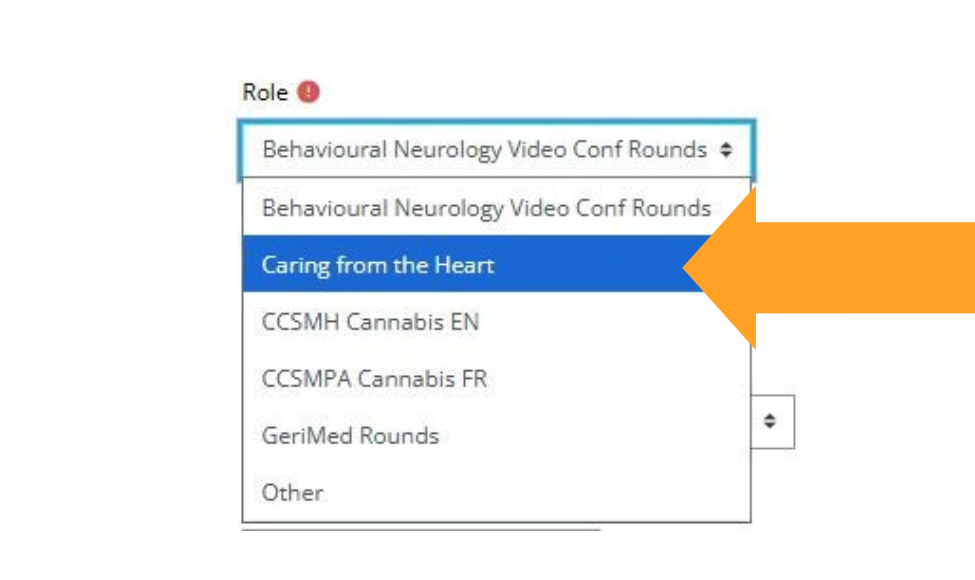
In the Role field, select “Caring from the Heart.”
This selection is required in order to access the course.
Certificate note: Enter your first and last name exactly as you would like them to appear on your Certificate of Completion.
3. Create your account
When all required fields are complete, select “Create my new account.”
4. Confirm your email address
Baycrest eLearning will send a confirmation email to the address you provided.
Open the email and follow the instructions to confirm your account. If you do not see the email, check your spam or junk folder.
5. Log in and begin the course
Return to Baycrest eLearning https://elearning.baycrest.org and log in using the username and password you created.
Caring from the Heart: Connecting Through Emotion-Based Dementia Care will be available in your account.
✓ Tip: Bookmark the Baycrest eLearning login page for easy access later.
3. READY TO BEGIN?
Start ELearning Modules
Once you are enrolled and logged in, open Caring from the Heart: Connecting Through Emotion-Based Dementia Care in your Course Catalogue to begin the eLearning modules.